Looking for Lumion system requirements? Read on!
Unlike CPU-bound rendering engines, Lumion is a real-time visualization tool that functions as a high-performance rasterization and ray-tracing hybrid. As of the latest 2025 and 2026 releases, the computational load has shifted significantly toward hardware-accelerated Ray Tracing (RT). Performance is no longer a simple linear function of clock speed, but a complex interaction between VRAM throughput, RT core generations, and system I/O.
This report provides a data-driven breakdown of hardware requirements to achieve stable frame rates in the Lumion viewport and minimize export times for 4K ray-traced sequences using the latest 2026-tier hardware.
Graphics Processing Unit (GPU): The Primary Engine
The GPU is the single most critical component in a Lumion workstation. Our benchmarking utilizes the PassMark G3DMark index and real-world 4K render throughput to determine efficiency tiers.
The Ray Tracing “Performance Delta”
With the transition to next-generation architectures (NVIDIA Blackwell / RTX 50-series and AMD RDNA 4), we have observed a non-linear increase in rendering efficiency. The latest RT cores handle the “Denoising” and “Ray-Casting” calculations with significantly lower latency than previous generations.
GPU Performance Index (2026 Benchmarks)
Relative Speed is indexed against a baseline RTX 3060 (1.0x).
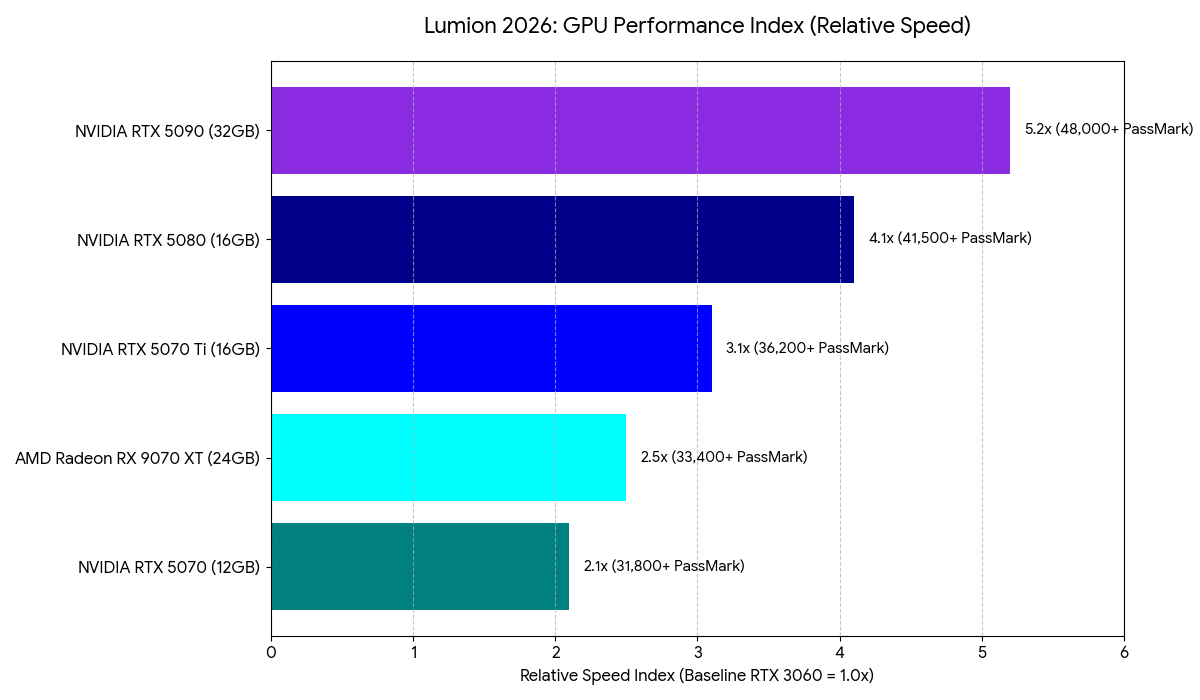
Our Insight: While the RX 9070 XT offers a massive 24GB VRAM buffer ideal for large textures, the RTX 5080 and 5070 Ti often maintain higher throughput in Lumion due to the specialized nature of NVIDIA’s OptiX integration within the Lumion engine.
Processor (CPU): Managing the Geometry Pipeline
The CPU’s primary role is to process the geometry from your CAD software (SketchUp, Revit, Rhino) and hand it off to the GPU. Lumion is heavily dependent on Single-Threaded performance for scene management and the LiveSync bridge.
- Professional Recommendation: Intel Core Ultra 9 285k or AMD Ryzen 9 9950X.
- Metric of Success: A Single-Thread CPUMark score of 3,600+ is recommended to ensure the GPU is never “starved” of data during real-time navigation.
Memory (RAM) and VRAM: Avoiding the Memory Swap
Lumion requires that the entire scene—including textures, geometry, and the asset library—reside in the GPU’s VRAM. When VRAM is exceeded, Lumion swaps data to system RAM, which is significantly slower.
- Minimum VRAM: 12GB (Found in the RTX 5070).
- Recommended VRAM: 16GB–24GB (Commercial and urban scale).
- System RAM: 64GB DDR5 is now the professional standard to allow for multi-tasking between Lumion and high-poly modeling applications.
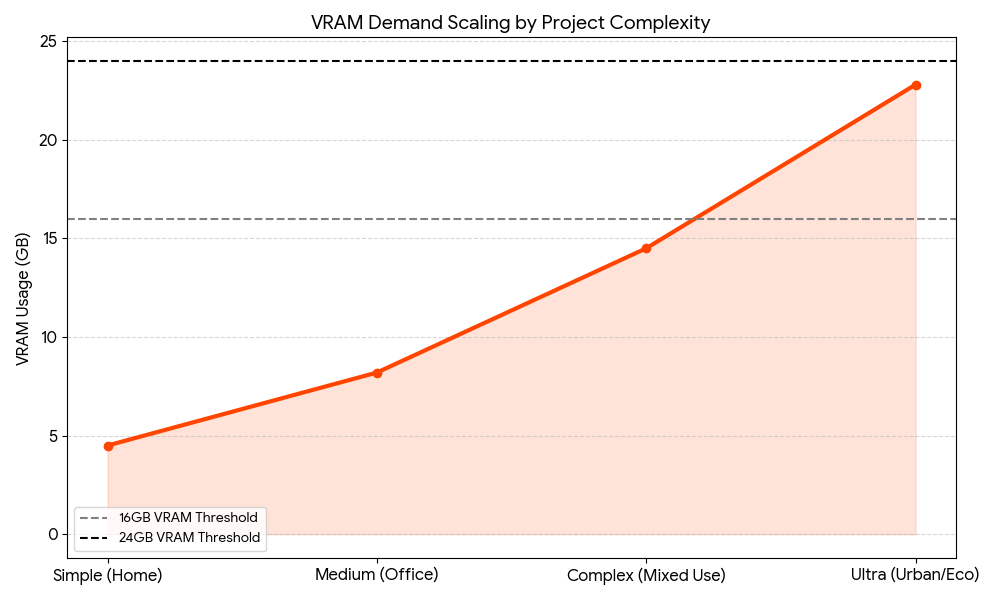
(See Figure: VRAM Demand Scaling by Project Complexity)
Lumion System Requirements Benchmark Visualizations
Fig 1. Rendering Throughput (4K Ray-Traced Still)
The following chart compares the time (in seconds) required to export a 4K photorealistic still with Ray Tracing (v2.0) enabled.
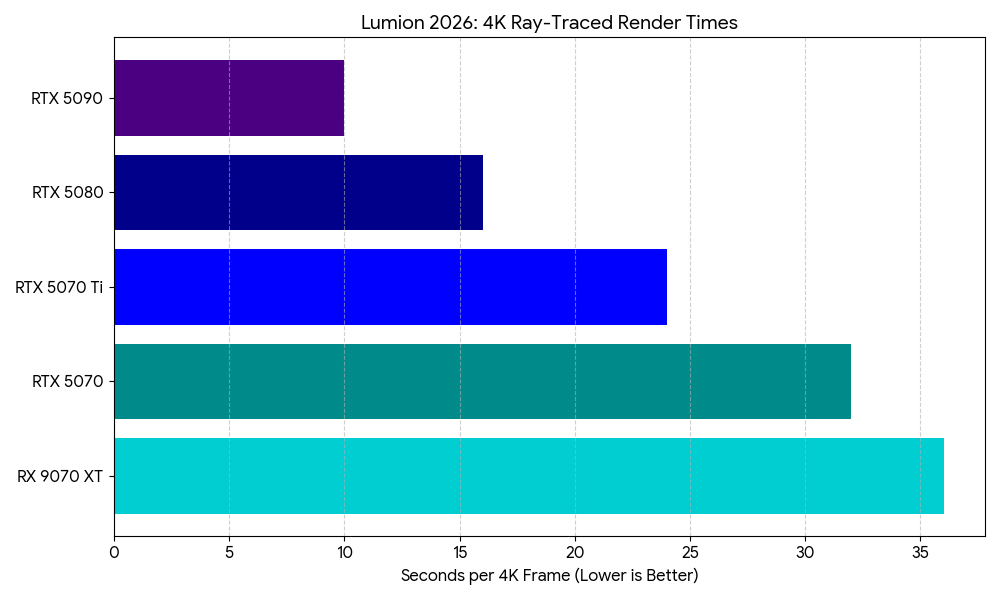
Fig 2. VRAM Demand Scaling by Complexity
As models increase in polygon count and texture resolution, VRAM usage follows an exponential curve. Utilizing “Fine-Detail Nature” assets is the primary driver of VRAM exhaustion.
Recommended Configurations (2025–2026)
Tier 1: The “Design Associate” (Standard Projects)
Ideal for single-family residential and small commercial projects.
- CPU: Intel Core 7 265k (5.6GHz Boost)
- GPU: NVIDIA GeForce RTX 5070 (12GB VRAM)
- RAM: 32GB DDR5-6000
- Storage: 1TB NVMe PCIe Gen4 (OS) + 2TB NVMe (Assets)
Tier 2: The “Visualization Lead” (Enterprise Scale)
Designed for complex ray-traced animations and large-scale master plans.
- CPU: AMD Ryzen 9 9950X or Intel Core 9 285k
- GPU: NVIDIA GeForce RTX 5080 (16GB VRAM) or RTX 5070 Ti
- RAM: 64GB DDR5-6000
- Storage: 2TB NVMe PCIe Gen5 (Project Drive)
The “Cinema Suite” (2026 Ultra-High End)
Maximum performance for 8K panoramas and cinema-quality video sequences.
- CPU: Intel Core Ultra 9 285k or AMD Ryzen 9 9950X3D
- GPU: NVIDIA GeForce RTX 5090 (32GB VRAM)
- RAM: 128GB DDR5
- Storage: 4TB PCIe Gen5 NVMe
Conclusion: The VRAM “Hard Limit” for Lumion
When it comes to Lumion system requirements, the transition to 2026-tier hardware highlights a critical trend: the VRAM threshold. While the RTX 5070 handles most residential tasks, the 16GB buffer on the RTX 5080 or 5070 Ti is the true sweet spot for professional architectural visualization. For those working on massive city-scale environments, the 32GB found in the RTX 5090 remains the only way to avoid the catastrophic performance drop associated with system memory swapping.
Configure a ProMagix HD80 Lumion Workstation now.

Josh Covington
Latest posts by Josh Covington (see all)
- Lumion System Requirements & Empirical Benchmarks - February 24, 2026
- Trimble SketchUp System Requirements & Empirical Benchmarks - February 17, 2026
- Revit 2026 System Requirements - February 11, 2026