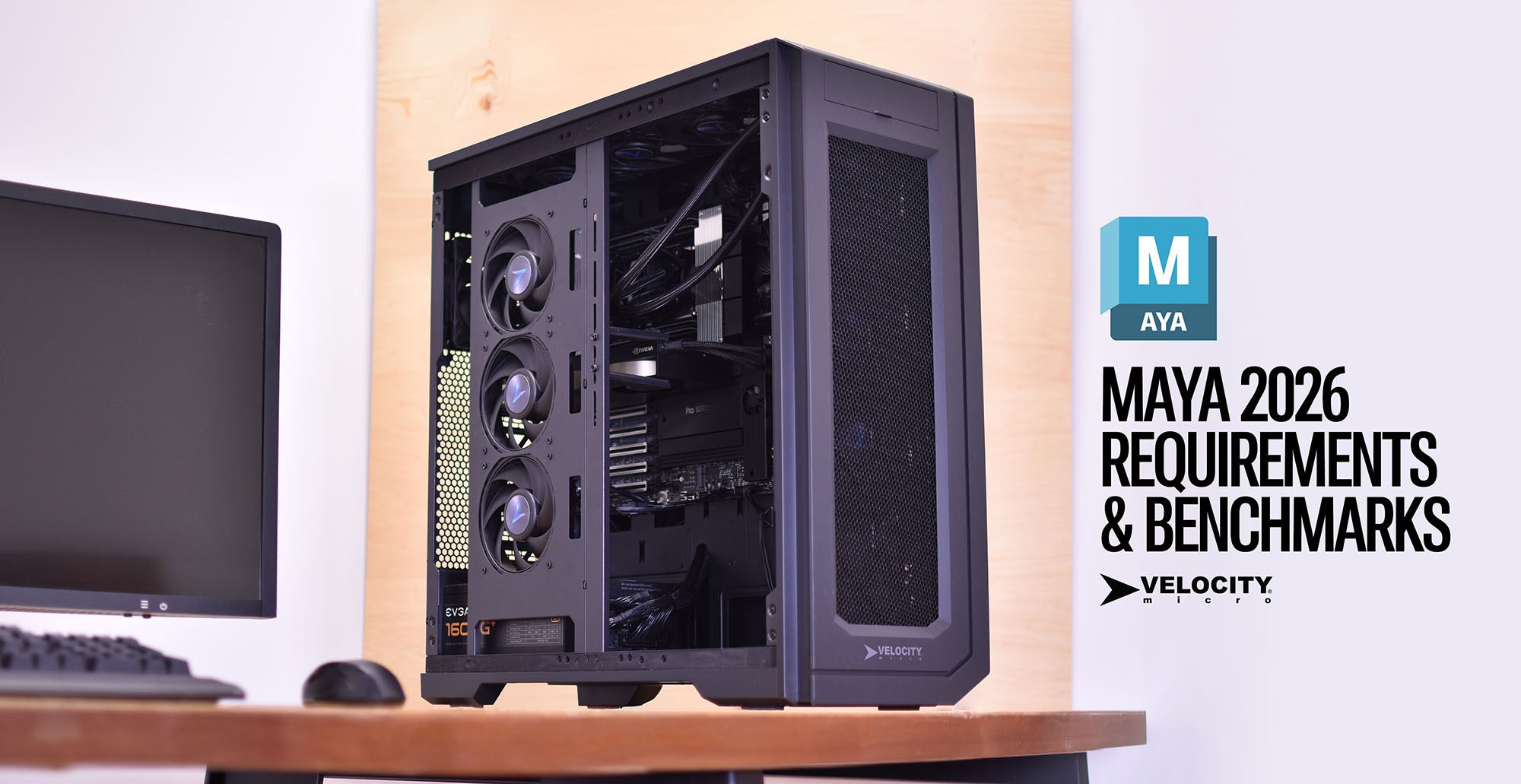
Interested in Maya System Requirements? Read on!
Autodesk Maya remains the industry standard for 3D animation, modeling, simulation, and rendering. However, because Maya is a multi-faceted application, its hardware demands vary significantly depending on whether you are focusing on viewport interaction, complex Bifrost simulations, or final-frame rendering.
Selecting the optimal configuration requires an understanding of how Maya utilizes system resources across different sub-tasks. This guide analyzes current hardware performance—including the latest GPU architectures and high-density DDR5 memory—to provide empirical recommendations for professional workflows.
Maya System Requirements: The Processor
The CPU is the primary engine for Maya. Its performance is divided into two categories: Single-Core (Active Work) and Multi-Core (Rendering/Sim).
Active Modeling and Animation
For tasks like modeling, rigging, and animation playback, Maya is primarily single-threaded. High clock speeds are more beneficial than high core counts here. A CPU with a high “boost” frequency ensures that the viewport remains responsive and that the UI does not lag when manipulating complex hierarchies.
Rendering and Simulation
When using Maya’s built-in Arnold renderer or running Bifrost liquid simulations, the software transitions to a multi-threaded workload. In these scenarios, the more cores available, the faster the computation.
Recommendations:
- Top Tier: AMD Ryzen 9 9950X or Intel Core Ultra 9 285k. These chips offer a balance of 5.7GHz+ boost clocks for modeling and high core counts for local rendering.
- Workstation Tier: AMD Threadripper 9000-series. For users doing heavy simulation or high-resolution Arnold rendering locally, the 32 or 64-core variants are essential to minimize downtime.
Maya System Requirements: The Graphics Card
The GPU’s role in Maya has expanded from merely driving the Viewport 2.0 to becoming the primary engine for rendering through Arnold GPU, Redshift, or V-Ray.
Viewport Performance
Viewport 2.0 relies on DirectX or OpenGL. Modern professional and consumer cards handle high-polygon counts with ease, but VRAM becomes the primary bottleneck when working with high-resolution textures and complex Shaders (OSL).
GPU Rendering
This is where the hardware requirements scale exponentially. If your pipeline utilizes GPU-accelerated renderers, the number of CUDA cores (NVIDIA) and the total VRAM are the two most critical metrics.
Recommendations:
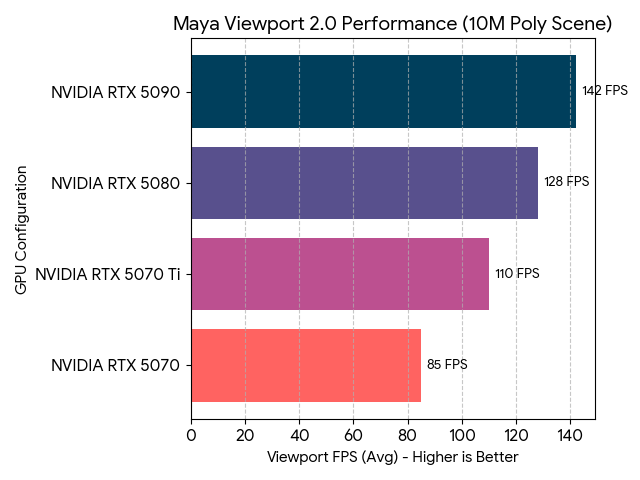
- NVIDIA GeForce RTX 5090 (32GB VRAM): The current gold standard for GPU rendering. The massive VRAM allows for rendering complex scenes without the “out of memory” errors common on lower-tier cards.
- NVIDIA GeForce RTX 5080 (16GB VRAM): Excellent for high-end modeling and animation where real-time viewport feedback is needed, though it may struggle with ultra-heavy production-grade GPU renders.
Memory (RAM)
Maya is notoriously memory-intensive, especially when dealing with high-resolution meshes or large particle caches.
- 32GB: The absolute minimum for professional work. Suitable for individual asset creation and light scenes.
- 64GB: The “Sweet Spot.” This provides enough headroom for Maya to run alongside supporting apps like ZBrush, Substance Painter, or Photoshop without aggressive swapping.
- 128GB+: Necessary for artists working on massive environments, high-end VFX, or heavy Bifrost simulations.
Storage Architecture
Slow storage is often the “silent killer” of productivity in Maya. Asset loading times and autosave lag can interrupt the creative flow.
- Primary (OS/Apps): 1TB NVMe Gen5 SSD.
- Secondary (Active Projects/Cache): 2TB+ NVMe Gen4/Gen5 SSD. Maya’s “Scratch” space and Bifrost caches should always live on the fastest drive possible to prevent simulation bottlenecks.
- Tertiary (Archive/Storage): High-capacity SATA SSDs or Enterprise HDDs for finished projects.
Estimated Benchmarks (April 2026)
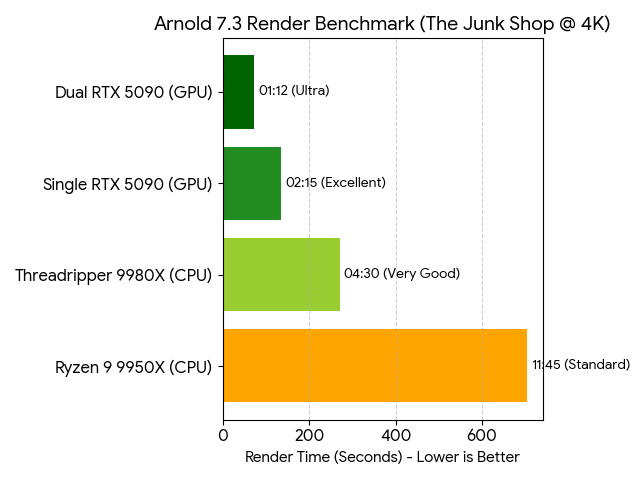
To illustrate the performance delta between modern configurations, we look at two primary metrics: Maya Viewport FPS (Interaction) and Arnold Render Time (Computation).
Maya Viewport 2.0 – Performance Score
Higher is better. Test Scene: 10-million polygon character rig with textures.
Arnold 7.3 Render Benchmark
Lower is better. Test Scene: “The Junk Shop” @ 4K resolution.
Final Recommended Configurations for Maya
ProMagix HD80 – Configure Now
- CPU: AMD Ryzen 9 9950X
- GPU: NVIDIA RTX 5080 16GB
- RAM: 64GB DDR5-6000+
- Storage: 2TB NVMe Gen5
ProMagix HD150 – Configure Now
- CPU: AMD Threadripper 9970X (32-Core)
- GPU: NVIDIA RTX 5090 32GB (Optional: Dual 5090s)
- RAM: 128GB+ DDR5 Registered ECC
- Storage: 4TB NVMe Gen5 (Dedicated Cache Drive)
By aligning your hardware with your specific workflow—prioritizing CPU clock speed for animation or VRAM and CUDA cores for rendering—you can ensure that Maya remains a tool for creativity rather than a source of technical frustration.
Configure your Maya Workstation now.

Josh Covington
Latest posts by Josh Covington (see all)
- Catia System Requirements & Empirical Benchmarks - August 4, 2026
- OEM vs Retail Components: Building a More Reliable Desktop - July 21, 2026
- 5 PC Innovations Velocity Micro Helped Pioneer - July 13, 2026