Interested in Premiere Pro System Requirements? Read on!
In the professional video production ecosystem, time is the most expensive variable. For editors and post-production houses, the “System Requirements” listed on software boxes are merely a baseline for stability, not a blueprint for productivity.
Thus, to achieve a seamless “Real-Time” editing experience—where the timeline responds instantly even with multiple Lumetri effects, Warp Stabilizers, and 4K/8K overlays—one must understand how Adobe Premiere Pro utilizes hardware. This guide provides a deep-dive analysis into component selection based on empirical benchmark data and hardware architecture.
1. The Processor (CPU): The Engine of the NLE
The CPU is the primary bottleneck for video editing. As a result, Premiere Pro’s performance is determined by a balance of high clock speeds (for UI responsiveness and standard playback) and high core counts (for rendering and encoding).
The QuickSync Advantage
For editors working with H.264 and HEVC (H.265) media—the most common codecs from mirrorless cameras and drones—Intel’s QuickSync technology remains the industry gold standard. By using the integrated GPU (iGPU) on Intel Core processors for hardware decoding/encoding, you free up the discrete GPU and CPU cores for other tasks.
CPU Benchmark Performance (Relative Score)
| CPU Model | Overall Score | 4K Playback | Exporting (H.264) |
| AMD Threadripper 9980X (64-core) | 1,420 | 165 | 148 |
| Intel Core Ultra 9 285k | 1,280 | 158 | 155 |
| AMD Ryzen 9 9950X | 1,260 | 152 | 142 |
| Intel Core Ultra 7 265k | 1,140 | 140 | 138 |
| AMD Ryzen 7 9700X | 980 | 120 | 115 |
The Verdict: The Sweet Spot: The Intel Ultra 9 285k offers the best price-to-performance ratio for most editors due to its high burst frequency and QuickSync capabilities.
-
The Powerhouse: If your workflow is 8K RED RAW or heavy Multicam (6+ cameras), the AMD Threadripper 9000 Series is necessary to handle the massive computational load.
2. Graphics Card (GPU): The Accelerator
While the CPU handles the “thinking,” the GPU handles the “painting.” Premiere Pro utilizes CUDA (NVIDIA) or OpenCL (AMD) to accelerate “GPU-accelerated effects” like Lumetri Color, Gaussian Blur, and Cross Dissolves.
VRAM: The Critical Metric
When working at 4K or higher resolutions, the amount of Video RAM (VRAM) is more important than the raw speed of the chip. If you run out of VRAM, Premiere will often crash or throw “Red Frame” errors.
- 4K Editing: 8GB VRAM (Minimum), 16GB (Recommended).
- 6K/8K Editing: 16GB – 32GB VRAM.
GPU Performance Comparison
| GPU Model | VRAM | 4K Effects Score | 8K Export Score |
| NVIDIA RTX 5090 | 32GB | 100 | 100 |
| NVIDIA RTX 5080 | 16GB | 92 | 88 |
| NVIDIA RTX 5070 Ti | 16GB | 85 | 82 |
| AMD Radeon 9070 XT | 16GB | 81 | 79 |
The Verdict: Overall, NVIDIA remains the preferred choice for Premiere Pro due to the maturity of CUDA drivers. The RTX 5070 Ti (16GB) is our primary recommendation for professional 4K editors who need high VRAM without the $2,000+ price tag of a 5090.
3. Memory (RAM): The Production Buffer
Premiere Pro is notoriously memory-hungry. RAM acts as the buffer between your storage and your CPU. If RAM is insufficient, the system swaps data to the much slower SSD, causing the “laggy timeline” syndrome when scrubbing through raw footage especially.
Capacity Recommendations
- 32GB: Unquestionably the absolute minimum for 1080p or simple 4K projects. We do not sell workstations with less than 32GB these days.
- 64GB: The professional standard for 4K workflows with After Effects dynamic linking.
- 128GB+: Required for 8K projects, heavy motion graphics, or working with LongGOP codecs (which require more memory to decode). Depending on speed requirements, this may mean Threadripper is a necessity.
4. Storage Architecture: Throughput & IOPS
Sequential read/write speeds (MB/s) are important for large files, but IOPS (Input/Output Operations Per Second) determine how fast Premiere can access thousands of small cache files. We recommend a Three-Drive Logic:
- Drive 1 (OS/Applications): 1TB+ NVMe SSD. Keeps the OS responsive.
- Drive 2 (Media/Project Files): 2TB – 8TB NVMe Gen4/Gen5 SSD. High-speed access to your raw footage, dependent upon capacity needs.
- Drive 3 (Dedicated Scratch/Cache): 1TB NVMe SSD. This is critical. By isolating the Media Cache on its own drive, you prevent “bus-choking” where the OS and Media compete for bandwidth.
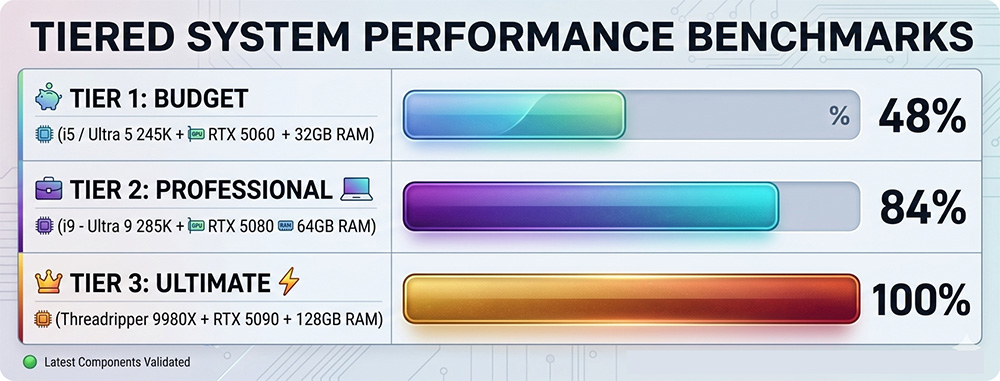
5. Visualizing Performance: Benchmark Synthesis
The following chart illustrates the performance delta across different hardware tiers when processing a 4K 60FPS HEVC sequence with multiple Lumetri layers.
Performance Index (Higher is Better)
6. Expert Recommendations: Three Configurations
The “Prosumer” Build (Budget-Friendly 4K)
Focus: Maximum value for YouTube/Social Media content.
- CPU: Intel Core Ultra 7 265k
- GPU: NVIDIA RTX 5070 (12GB)
- RAM: 32GB DDR5-6000
- Storage: 1TB Samsung 990 Pro (OS) + 2TB Samsung 9100 Pro
The “Agency Standard” (Professional 4K/60)
Focus: Stability and speed for daily professional deliverables.
- CPU: Intel Core Ultra 9 285k
- GPU: NVIDIA RTX 5080 (16GB)
- RAM: 64GB DDR5-6000
- Storage: 1TB NVMe (OS), 2TB NVMe (Media), 1TB NVMe (Cache)
The “Cinema Grade” (8K/Multicam/RAW)
Focus: No-compromise performance for feature films and high-end commercials.
- CPU: AMD Ryzen Threadripper 9960X (24-Core) or higher
- GPU: NVIDIA RTX 5090 (32GB) or RTX Pro 6000 Blackwell
- RAM: 256GB DDR5 RDIMM
- Storage: Multi-drive NVMe RAID array and/or 10GbE NAS for archival
Premiere Pro System Requirements: Conclusion
Undoubtedly, building a workstation to satisfy Premiere Pro System Requirements is an exercise in removing bottlenecks. While the CPU remains the most vital component, ignoring VRAM or drive architecture will result in a suboptimal experience regardless of how much you spend on a processor. For the modern professional, an Intel Core Ultra 9 paired with an NVIDIA RTX 50-series card (16GB+ VRAM) and a dedicated cache drive represents the pinnacle of current editing efficiency.
Get started with our ProMagix HD80 Workstation, designed and optimized for Premiere Pro.

VM Staff
Latest posts by VM Staff (see all)
- The Hidden Costs of Cloud AI – and Why Purpose-Built Local Workstations Are the Solution - August 26, 2026
- EPYC 9006 Series: What You Need To Know - August 19, 2026
- Local AI vs. Cloud AI: How PC Hardware Requirements Change - July 16, 2026